
Using the Bankruptcy List on the iMSiG.pl is subject to certain usage limits, which depend on your subscription plan.
To avoid unexpected restrictions on data access, it’s a good idea to regularly check your account’s data usage.
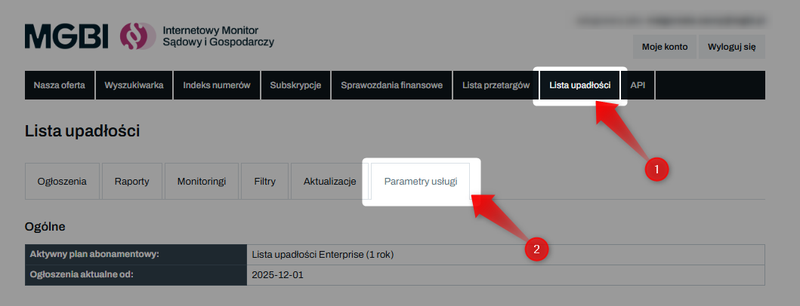
You can find all the key information in the"Service Parameters"tab, located in the top menu of the Bankruptcy List panel:
General Section
In this section, you can check the name of your current subscription plan and the most important date for your account—“Effective as of”:
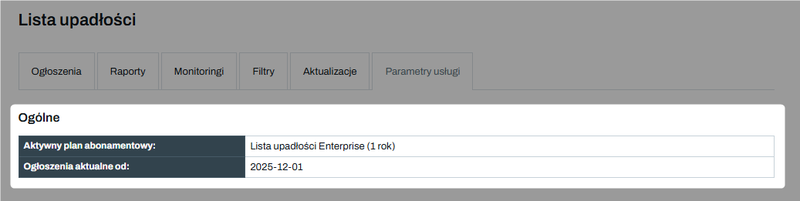
- Current listings include all posts published since the first day of the month in which you activated the service.
- Archived listings are data from before that date (dating back to 2001).
This distinction is crucial because the two types of ads have separate search limits.
Users and subaccounts
Here you can see how many users can access the dashboard at the same time.
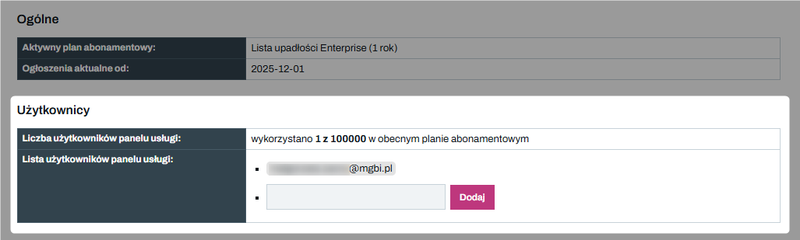
You can only add or remove subaccounts from the main account.
Search Engine and Classifieds
This section shows how many manual debtor inquiries you made in a given month.
- The "Number of searches" counter counts every click of the "Search" button for current listings, regardless of whether any results were found.
- A separate counter tracks the number of searches for archived listings —this limit refers to the total number of unique debtors checked in the past during a given month.
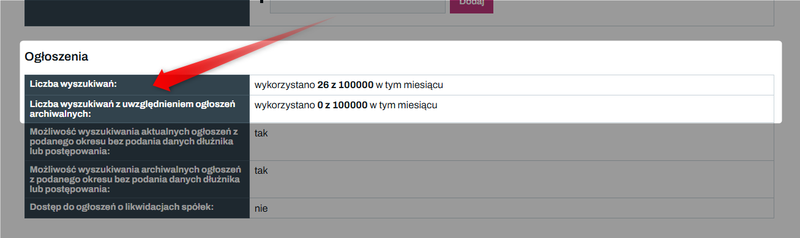
In the same place, you can also check other benefits—depending on your subscription plan—that go beyond the data limits:
✅ Search without identifiers
Here you can check whether you can search current and archived notices for a selected period without entering registration numbers or case reference numbers.
This feature allows you, for example, to download all announcements from a given day and is available in the Pro and Enterprise plans. The Mini and Standard plans require you to specify a specific entity.
✅ Notices of company liquidations
This section also provides information on access to notices of company liquidations initiated by shareholders or registration courts.
Access to this data is an additional service that is not included in the basic Bankruptcy List plans and requires separate activation.
Are you interested in receiving notifications about liquidations?
Contact us and request a quote → Go to the contact form
Reports
In the "Reports" section, you can check how many reports (current or archived) you have generated this month.
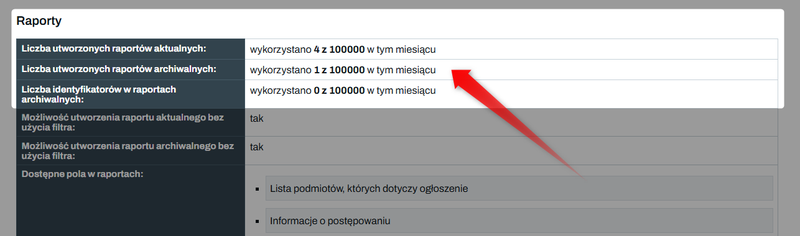
Here, you can also check whether you have permission to create reports without using filters.
This allows you to download a complete set of data for a selected period without having to specify specific debtors.
This feature is available only to Pro and Enterprise plan holders.
Monitoring
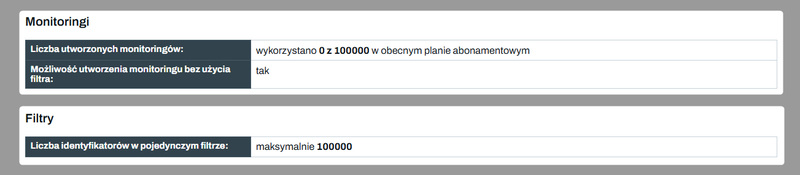
In the"Monitoring"section, you can check the number of active email notifications for your account. Each subscription plan has a different filter capacity (the maximum number of identifiers in a single filter).
API Key and Limits
This section is relevant for companies that use automation via the Bankruptcy List API.
Here you will find:
- Your unique API key (token), which is required for integration with CRM systems.
- A counter showing the number of API requests made in a given month.
- Link to the full technical documentation.

Increasing limits
What to do if you reach your data limit depends on which subscription plan you have with Bankruptcy List.
Mini and Standard Plans – if you use up your monthly limits for searches, reports, or archived debtors, you can:
- upgrade to a higher plan (you can do this at any time),
- wait for your limits to be reset (they are reset to zero at the start of each billing cycle).
Pro Plan – users on this plan don’t need to upgrade to the Enterprise plan to gain additional features. The Pro Plan offers additional options that you can purchase at any time:
➡️ Archival ID packages
If the limit for archived listings proves to be insufficient, you can purchase additional ID checks.
Each top-up increases the limit by 1,000 additional debtors, but it does not renew automatically. This is a one-time purchase that can be made even during the billing month if the base limit for the Pro plan has been exhausted.
➡️ Change in the archive date
If you are on the Pro plan and need unlimited access to all listings published before the 1st of the month in which the service was activated, you can extend the cutoff date for current listings. This will incur an additional fee for each month of the extension.
Once this action is completed, listings from the period you selected will be treated as current listings, meaning the limits for this type of listing will apply to them, rather than the limits for archived listings as was previously the case.
Are you interested in purchasing one of the options above?
Contact us → Go to the contact form
You can find the full list of services and a description of the limits in the Bankruptcy List here: Bankruptcy List - Price List