
Search for information about business partners directly in the dashboard Bankruptcy List on the iMSiG.pl is convenient for individual cases.
However, on a larger scale (e.g., hundreds or thousands of contractors, or integration with CRM or debt collection systems), manual processing becomes inefficient.
In such cases, we recommend using the API, which allows you to:
- automatic verification of debtors' status,
- periodic retrieval of ad content,
- data integration with internal systems (CRM, ERP, debt collection systems).
In this guide, you will learn how to download the full text of bankruptcy and restructuring notices for a specific debtor using their registration numbers (NIP, KRS, REGON, PESEL).
What is the Bankruptcy List API?
AnAPI (Application Programming Interface) is a set of rules and protocols that enable different computer systems to communicate directly with one another.
It acts as a"digital bridge" that allows your software (such as CRM or ERP) to automatically access the features and resources of the MGBI database without human intervention.
The API mechanism can be compared to a service window at a government office, where your system "submits" the debtor's ID and immediately receives a complete set of documents in response.
Authorization key
Every API request must be authenticated. This is done using a unique API key (authorization key/token), which identifies your subscription and controls the available request limits.
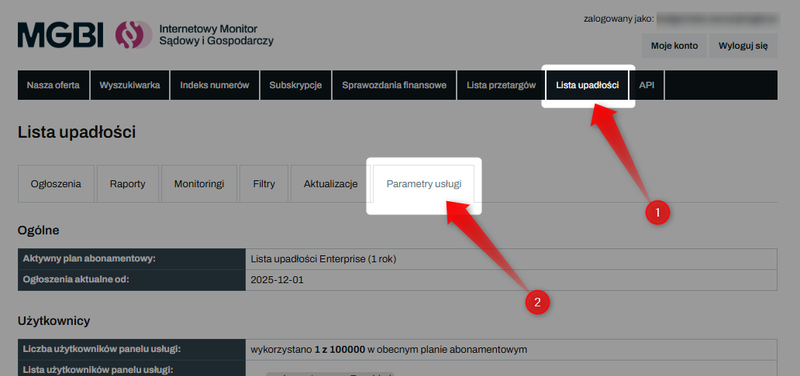
To obtain an API key, log in to the website iMSiG.pl, go to the "Bankruptcy List" tab, and then open "Service Settings".
At the bottom of the page, in the"API"section, you'll find your authorization key and a link to the full documentation ("API Version").
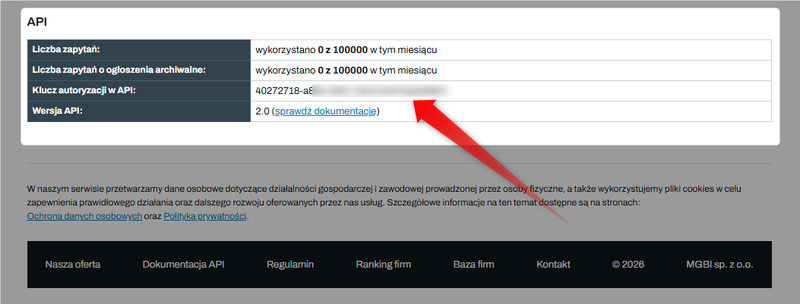
Please note that the API key is shared among all users within a single subscription, which means that the main account and all subaccounts use the same key (token).
Downloading debtor notices
Ad content is retrieved using GET requests (used to read data) sent to the appropriate API endpoint.
1. Primary endpoint
GET /v2/announcements
This endpoint is used to search for and retrieve notices from the Court and Economic Monitor (MSiG) and the National Debt Register (KRZ).
For a detailed description of the parameters, please refer to the technical documentation: Bankruptcy List - API Documentation.
2. Debtor ID
To download notices regarding a specific entity, you must provide at least one identification number:
- "nip=" – tax identification number (e.g., 5213482472).
- "pesel=" – PESEL number (individuals, including consumer bankruptcy).
- "krs=" – National Court Register number (companies, foundations, associations),
- "regon=" – REGON number (9 or 14 digits),
3. Important parameter: append_first_entry
In the Court and Economic Monitor, the debtor’s identification numbers (NIP, KRS, REGON) often appear only in the first notice for a given case.
Subsequent notices (e.g., regarding a repayment plan or a change in the trustee) may no longer include identification numbers.
Therefore, it is essential to set the following parameter in the query:
append_first_entry=true
This allows the API to locate the first notice in the case, identify the debtor based on that notice, and return all notices related to that proceeding, even if they do not contain the identifier in their text.
Without this parameter, the answer may be incomplete.
4. Sample query
Let’s say you want to download bankruptcy and restructuring notices for a company based on its tax identification number.
The HTTP request should look like this:
GET /v2/announcements?nip=1234567890&append_first_entry=true HTTP/1.1
Host: api.imsig.pl
Authorization: [authorization key]
Similarly, instead of the "nip=" parameter, you can use "krs=", "regon=" or "pesel=".
Data structure
The API returns data in a structured JSON format, which allows for its automatic processing in any IT system.
Main sections of the response
The API response can be divided into the following data groups:
- id - the unique identifier of the listing in the MGBI database
- meta - technical information about the record, including the publication date and the dates of the first and last updates to the announcement in the system.
- entity - detailed information about the entity (or entities) involved in the case: name, legal form, PKD code, and registered office address.
- proceeding - details of the court proceedings: name of the court, case number, and information about the trustee or supervisor (name or full name, title).
- order- details regarding a specific court ruling, such as its date.
- krz_entry / msig_entry - detailed publication parameters depending on the source (chapter, section, link to the original announcement on the government portal).
- content - the full text of the ad is available in two formats: text and HTML.
You can find a complete list and description of the fields in the API documentation, under "GET /v2/announcements": Check the documentation
HTTP response codes
The most common response codes your system should handle:
- 200 (Success): The request was processed successfully.
- 401 / 403 (Authorization error): Invalid or missing API key.
- 429 (Limit exceeded): You have used up your monthly query quota.
Sample answer
{
  "id": "651d667e2323c65e8e17e295",
  "meta": {
    "issue_date": "2023-10-04",
    "category": "K.0.3.16",
    "first_update_date": "2023-10-04",
    "last_update_date": "2023-11-05",
    "is_administrator_data_consistent": true,
    "is_correction": false,
    "is_entity_data_consistent": true
  },
  "entity": [
    {
    "info": {
        "cleaned_name": "VB Leasing SA",
        "legal_form": "spółki akcyjne",
        "ownership_type": "własność prywatna krajowa pozostała",
        "primary_business": "64.91.Z Leasing finansowy",
        "commencement_date": "2008-04-02"
     },
    "numbers": {
        "nip": "5213482474",
         "regon": "141374292",
         "krs": "0000307665"
     },
    "address": {
         "state": "dolnośląskie",
         "powiat": "Wrocław",
         "gmina": "Wrocław-Fabryczna",
         "town": "Wrocław",
         "street": "ul. Fabryczna",
         "house_number": "6",
         "zip_code": "53-609"
     }
   }
  ],
  "proceeding": {
    "court_name": "Sąd Rejonowy dla Wrocławia-Fabrycznej we Wrocławiu",
    "court_department": "VIII Wydział Gospodarczy",
    "signatures": [
        "WR1F/GR/16/2023",
        "WR1F/GRs/5/2023"
    ],
    "administrator_name": "Ams Restrukturyzacje sp. z o.o.",
    "administrator_function": "syndyk",
    "administrator_address": "ul. Pawła Włodkowica 10 lok. 3",
    "administrator_zip_code": "50-072","administrator_town": "Wrocław"
  },
  "order": {},
  "krz_entry": {
    "chapter": 0,
    "section": 3,
    "subsection": 16,
    "signature": "20231004/00341",
    "issue_date": "2023-10-04",
    "url": "https://krz.ms.gov.pl/#!/application/KRZPortalPUB/1.4/KrzRejPubGui.SzczegolyObwieszczenia?params=JTdCJTIyaWRaZXduZXRyem55JTIyJTNBJTIyZWMzYTllODctOTljZC00YTg2LTljNzQtOThkZDQxZmI1MjFhJTIyJTdE"
  },
  "content": {
    "text": "Sąd Rejonowy dla Wrocławia-Fabrycznej we Wrocławiu, VIII Wydział Gospodarczy, ul. Poznańska 16, 53-630 Wrocław, obwieszcza, że Postanowienie Sądu o otwarciu postępowania sanacyjnego wydane w postępowaniu WR1F/GR/16/2023, w dniu 25 lipca 2023 r., o oznaczeniu WR1F/GR/16/2023/39, w zakresie rozstrzygnięcia w przedmiocie otwarcia postępowania restrukturyzacyjnego jest prawomocne z dniem 25 lipca 2023 r.",
    "html": "Sąd Rejonowy dla Wrocławia-Fabrycznej we Wrocławiu, VIII Wydział Gospodarczy, ul. Poznańska 16, 53-630 Wrocław, obwieszcza, że Postanowienie Sądu o otwarciu postępowania sanacyjnego wydane w postępowaniu WR1F/GR/16/2023, w dniu 25 lipca 2023 r., o oznaczeniu WR1F/GR/16/2023/39, w zakresie rozstrzygnięcia w przedmiocie otwarcia postępowania restrukturyzacyjnego jest prawomocne z dniem 25 lipca 2023 r.",
    "url": "https://www.imsig.pl/lista-upadlosci/ogloszenia/651d667e2323c65e8e17e295"
  }
}
Limits
Every API request sent to the "/v2/announcements" endpoint reduces the monthly request quota assigned to your subscription.
The system distinguishes between two basic limits for the API, depending on the publication date of the announcements:
1️⃣ Current announcements – published before the first day of the month in which your service is activated.
2️⃣ Archived listings – these include data from before the first day of the month in which the service was activated. Downloading them uses a separate query limit for archived listings. The number of queries allowed depends on your subscription plan.
The limit is reduced with each function call, regardless of the number of listings returned in the response or whether the query pertained to a single entity or the entire period.
Generating a query that returns no results (an empty list) also reduces the available limit.
Searches in the Bankruptcy List panel and queries performed automatically via the API use the same pool of available queries.
We recommend regularly checking your limits, especially during integration testing, when first launching automated processes, and when working with large numbers of identifiers.
Exceeding the limit
Once the available quota of API requests has been used up, the API will return the response code: "429 – Too Many Requests".
This code indicates that the monthly limit has been reached and further requests will not be processed until the limit is reset at the start of the next billing cycle or the subscription plan is upgraded (at any time).
This is an intentional block resulting from the service billing rules and should be treated as a signal to suspend further requests.
👉 Learn more about limits: How do I check my limit usage in the Bankruptcy List?
👉 Check out our current offerings and price list: Bankruptcy List - Price List