
If you manage a large portfolio of entities and, for security reasons or due to internal regulations, do not want to share their identifiers externally, the optimal solution is "batch downloading."
Instead of querying each customer individually, you retrieve a set of new listings published in KRZ and MSIG during the selected time period.
- The ability to search for and download all current bankruptcy listings without entering the debtor’s identification information (e.g., tax ID, social security number) is available exclusively in the Pro and Enterprise Bankruptcy List plans.
- The Mini and Standard plans always require a specific ID to be provided.
In this guide, you will learn how to download a complete set of bankruptcy and restructuring notices for a selected period without having to enter the identifiers of the entities you are interested in.
What is the Bankruptcy List API?
AnAPI (Application Programming Interface) is a set of rules and protocols that enable different computer systems to communicate directly with one another.
It acts as a"digital bridge" that allows your software (such as CRM or ERP) to automatically access the features and resources of the Bankruptcy List without human intervention.
In practice, your system “connects” to a virtual government service portal, authenticates itself using a unique key, and immediately receives the requested set of documents in a machine-readable format.
Authorization key
Every API request must be authenticated. This is done using a unique API key (authorization key/token), which identifies your subscription and controls the available request limits.
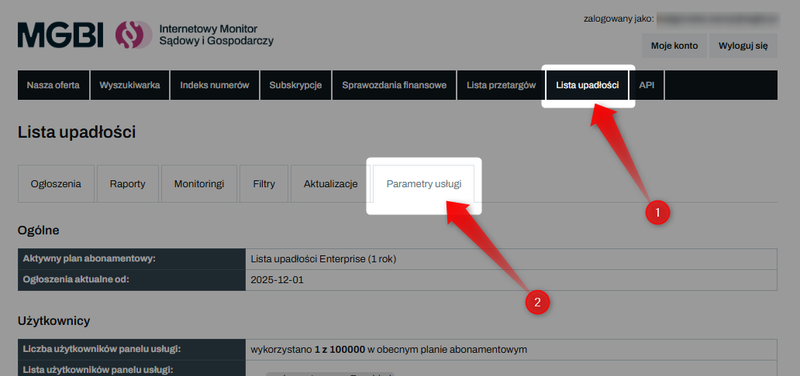
To obtain an API key, log in to the website iMSiG.pl, go to the "Bankruptcy List" tab, and then open "Service Settings".
At the bottom of the page, in the"API"section, you'll find your authorization key and a link to the full documentation ("API Version").
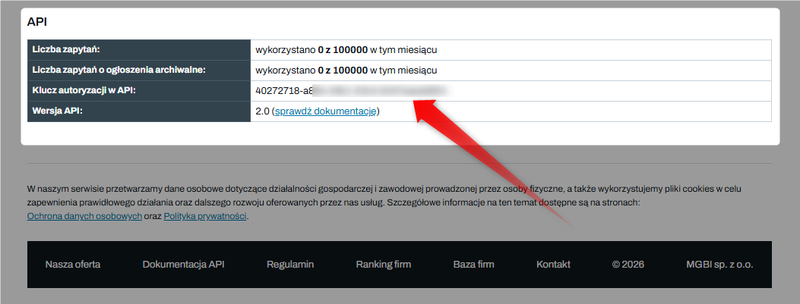
Please note that the API key is shared among all users within a single subscription, which means that the main account and all sub-accounts use the same key.
Step 1: Check the list of updates
To retrieve data for a specific period, you must first identify the update IDs that were added to our database during that period.
Query parameters:
- Start of time range: creation_datetime_from
- End of time range: creation_datetime_to
Base power supply frequency:
- National Debt Register (KRZ): Data is updated hourly on business days (7 a.m.–9 p.m.).
- Court and Business Monitor (MSiG): The site is updated once a day, usually around 11 a.m.
The National Debt Register is sometimes updated late into the evening, so we recommend waiting until the following morning to retrieve data from the previous day.
The most effective method is to run a scheduled task that queries the API in the morning for updates from the past 24 hours.
Sample query
GET /v2/updates?creation_datetime_from=2026-09-22T00:00:00Z&creation_datetime_to=2026-02-02T00:00:00Z HTTP/1.1
Host: api.imsig.pl
Authorization: [authorization key]
In response, you will receive a list of all updates made to our service during the specified time period, along with their unique update IDs and the number of announcements in each one.
[
  {
    "id": 8002,
    "creation_datetime": "2026-02-02T22:17:13.915000+02:00",
    "issue_date": "2026-09-22",
    "announcements_count": 1,
    "source": "krz"
  },
  {
    "id": 8001,
    "creation_datetime": "2026-02-02T20:17:25.733000+02:00",
    "issue_date":"2026-09-22",
    "announcements_count": 5,
    "source": "krz"
  },
  {
    "id": 8000,
    "creation_datetime": "2026-02-02T18:17:25.001000+02:00",
    "issue_date": "2026-09-22",
    "announcements_count": 5,
    "source": "krz"
  },
  {
    "id": 7999,
    "creation_datetime": "2026-02-02T17:17:24.751000+02:00",
    "issue_date": "2026-09-22",
    "announcements_count": 5,
    "source": "krz"
  },
  ...
]
Step 2: Downloading ad content
When the API returns a list of updates:
- Determine which of them you haven't downloaded the ads for yet.
- Write down their IDs: id (e.g., 8002).
- For each update ID, call the main announcements endpoint at GET /v2/announcements, passing the ID in the update_id parameter.
Sample query
GET /v2/announcements?update_id=8002 HTTP/1.1
Host: api.imsig.pl
Authorization: [authorization key]
This query will return all the listings (in JSON format) included in this specific update.
[
  {
    "id": "650df6494634a8d43457cad8",
    "meta": {
      "issue_date": "2026-02-02",
      "category": "K.0.8.48",
      "first_update_date": "2026-02-02",
      "last_update_date": "2026-02-02",
      "is_administrator_data_consistent": true,
      "is_correction": false,
      "is_entity_data_consistent": true
    },
    "entity": [
      {
        "info": {
          "cleaned_name": "Geo-Term Polska SA",
          "legal_form": "spółki akcyjne",
          "ownership_type": "własność mieszana w sektorze prywatnym z przewagą własności krajowych osób fizycznych",
          "primary_business": "74.10.Z Działalność w zakresie specjalistycznego projektowania",
          "commencement_date": "1995-06-20"
        },
        "numbers": {
          "nip": "9540020399",
          "regon": "272624250",
          "krs": "0000426336"
        },
        "address": {
          "state": "małopolskie",
          "powiat": "oświęcimski",
          "gmina": "Oświęcim","town": "Oświęcim",
          "street": "ul. Chemików",
          "house_number": "1",
          "zip_code": "32-600"
        }
      }
    ],
    "proceeding": {
      "court_name": "Sąd Rejonowy dla Krakowa-Śródmieścia w Krakowie",
      "court_department": "VIII Wydział Gospodarczy dla spraw upadłościowych i restrukturyzacyjnych",
      "signatures": [
        "KR1S/GRz-nu/49/2026",
        "KR1S/GRz/71/2026"
      ],
      "administrator_name": "Wojciech Zymek",
      "administrator_function": "syndyk",
      "administrator_licence_number": 104,
      "administrator_address": "Doradca Restrukturyzacyjny Wojciech Zymek  ul. Jesionowa 22",
      "administrator_zip_code": "40-158",
      "administrator_town": "Katowice",
      "administrator_source_url": "https://krz-rdr-gui-krz-rdr-prod.apps.ocp.prod.ms.gov.pl/rdr-api/wyszukiwarka/doradcy/1003"
    },
    "order": {
      "order_date": "2026-02-02"
    },
    "krz_entry": {
      "chapter": 0,
      "section": 8,
      "subsection": 48,
      "signature": "20260202/00445",
      "issue_date": "2026-02-02",
      "url": "https://krz.ms.gov.pl/#!/application/KRZPortalPUB/1.4/KrzRejPubGui.SzczegolyObwieszczenia?params=JTdCJTIyaWRaZXduZXRyem55JTIyJTNBJTIyZjI2NmQwNzItNWNlMC00OGNhLTg2MjItMjFkN2UzZGMzM2Q0JTIyJTdtE"
    },
    "content": {
      "text": "Sąd Rejonowy dla Krakowa-Śródmieścia w Krakowie VIII Wydział Gospodarczy dla spraw upadłościowych i restrukturyzacyjnych ul. Przy Rondzie 7, 31-547 Kraków, obwieszcza, że postanowieniem z 22 września 2026 r. wydanym w sprawie po wpłynięciu wniosku o zatwierdzenie układu w postępowaniu o zatwierdzenie układu dłużnika, którym jest GEO-TERM POLSKA spółka akcyjna z siedzibą w Oświęcimiu (KRS 0000426336), sygnatura akt KR1S/GRz/71/2026, postanowił:\n\nna podstawie art. 165 ust. 1 w zw. z art. 223 ust. 1 ustawy z dnia 15 maja 2015 r. Prawo restrukturyzacyjne odmówić zatwierdzenia układu.\n\nNa niniejsze postanowienie przysługuje zażalenie do Sądu Okręgowego w Krakowie XII Wydział Gospodarczy Odwoławczy za pośrednictwem Sądu Rejonowego dla Krakowa-Śródmieścia w Krakowie VIII Wydział Gospodarczy dla spraw upadłościowych i restrukturyzacyjnych. Zażalenie należy wnieść w terminie dwóch tygodni od dnia niniejszego obwieszczenia. Zażalenie podlega opłacie w wysokości 200,00 zł. Sąd odrzuci zażalenie, jeżeli będzie ono spóźnione, nieopłacone lub dotknięte brakami, które nie zostaną usunięte mimo wezwania.",
      "html": "Sąd Rejonowy dla Krakowa-Śródmieścia w Krakowie VIII Wydział Gospodarczy dla spraw upadłościowych i restrukturyzacyjnych ul. Przy Rondzie 7, 31-547 Kraków, obwieszcza, że postanowieniem z 2.02.2026 r. wydanym w sprawie po wpłynięciu wniosku o zatwierdzenie układu w postępowaniu o zatwierdzenie układu dłużnika, którym jest GEO-TERM POLSKA spółka akcyjna z siedzibą w Oświęcimiu (KRS 0000426336), sygnatura akt KR1S/GRz/71/2026, postanowił:na podstawie art. 165 ust. 1 w zw. z art. 223 ust. 1 ustawy z dnia 15 maja 2015 r. Prawo restrukturyzacyjne odmówić zatwierdzenia układu.Na niniejsze postanowienie przysługuje zażalenie do Sądu Okręgowego w Krakowie XII Wydział Gospodarczy Odwoławczy za pośrednictwem Sądu Rejonowego dla Krakowa-Śródmieścia w Krakowie VIII Wydział Gospodarczy dla spraw upadłościowych i restrukturyzacyjnych. Zażalenie należy wnieść w terminie dwóch tygodni od dnia niniejszego obwieszczenia. Zażalenie podlega opłacie w wysokości 200,00 zł. Sąd odrzuci zażalenie, jeżeli będzie ono spóźnione, nieopłacone lub dotknięte brakami, które nie zostaną usunięte mimo wezwania.",
  "url": "https://www.imsig.pl/lista-upadlosci/ogloszenia/650df6494634a8d43457bad8"
    }
  },
    ...
]
After downloading the announcements, you should compare their number with the value of the "announcements_count" parameter from the first step to ensure that your system has correctly retrieved all the data from the selected update.
Data structure
The data is returned in JSON format, which allows it to be imported directly into internal systems (such as CRM or ERP).
Main sections of the response
The API response can be divided into the following data groups:
- id - the unique identifier of the listing in the MGBI database
- meta-technical information about the record, including the publication date (issue_date) and the dates of the first and last updates to the notice in the system.
- entity - detailed information about the entity (or entities) involved in the case: name, legal form, PKD code, and registered office address.
- proceeding - details of the court proceedings: name of the court, case number, and information about the trustee or supervisor (name or full name, title).
- order- details regarding a specific court ruling, such as its date.
- krz_entry / msig_entry - detailed publication parameters depending on the source (chapter, section, link to the original announcement on the government portal).
- content - the full text of the ad is available in two formats: text and HTML (preserving the original structure).
You can find a complete list and description of the fields in the API documentation, under the "GET /v2/announcements" section: Check the documentation
HTTP response codes
The most common response codes your system should handle:
- 200 (Success): The request was processed successfully.
- 401 / 403 (Authorization error): Invalid or missing API key.
- 429 (Limit exceeded): You have used up your monthly query quota.
If you receive error code 429 (Too Many Requests), it means that your monthly request limit has been reached.
Limits
Every API request sent to the "/v2/announcements" endpointreduces the monthly request quota assignedto your subscription.
The system distinguishes between two basic limits for the API, depending on the publication date of the announcements:
1️⃣ Current announcements – published before the first day of the month in which your service is activated.
2️⃣ Archived listings – these include data from before the first day of the month in which the service was activated. Downloading them uses a separate query limit for archived listings. The number of queries allowed depends on your subscription plan.
The limit is reduced with each function call, regardless of the number of listings returned in the response or whether the query pertained to a single entity or the entire period.
Generating a query that returns no results (an empty list) also reduces the available limit.
Manual queries made in the Bankruptcy Lists panel and automatic queries made via the API use the same pool of available queries.
We recommend regularly checking your limits, especially during integration testing, when first launching automated processes, and when working with large numbers of identifiers.
Exceeding the limit
Once the available quota of API requests has been used up, the API will return the response code: "429 – Too Many Requests".
This code indicates that the monthly limit has been reached and further requests will not be processed until the limit is reset at the start of the next billing cycle or the subscription plan is upgraded (at any time).
This is an intentional block resulting from the service billing rules and should be treated as a signal to suspend further requests.
👉 Learn more about limits: How to check your limit usage in the Bankruptcy List?
👉 Check the current offer and price list: Bankruptcy List - Price List